Turn a list of symbols
into a research workspace.
Find candidates, open the company or fund context, and bring historical observations into an export your team can revisit.
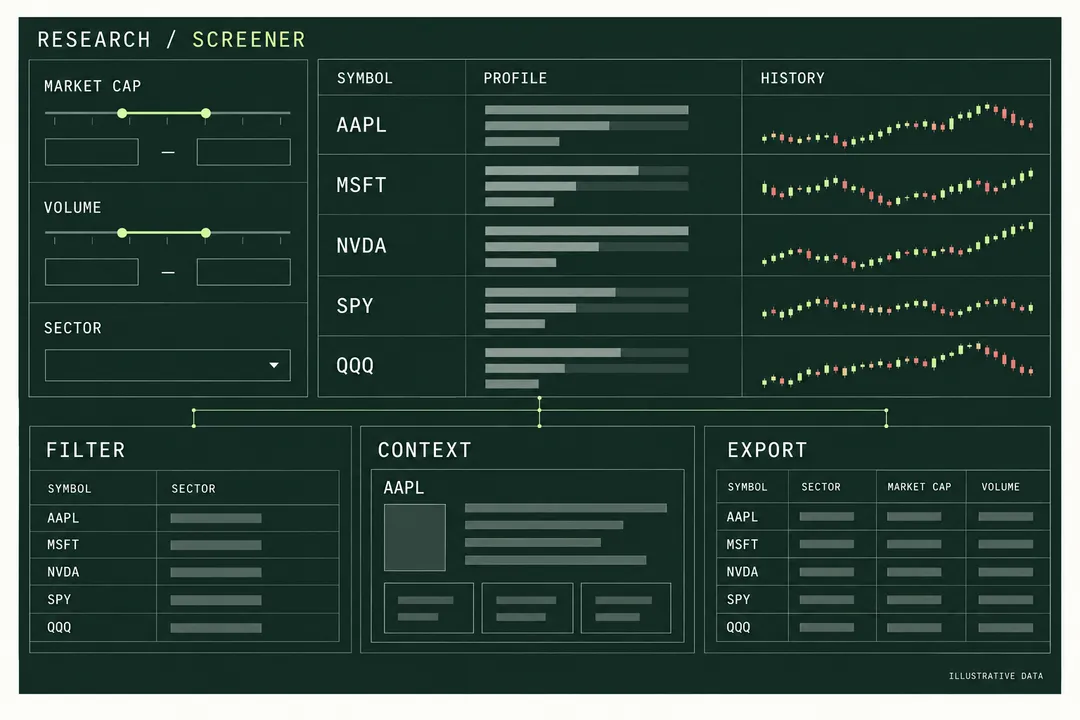
Integration blueprint · not a live application. Neutral endpoints and account access still require validation.
Three pieces.
One useful workspace.
Research dashboards, financial data notebooks and internal screening tools.
Filter the universe
Choose metadata-defined filters, columns and sorting.
Inspect each match
Company financials, fund holdings and instrument context.
Make analysis repeatable
Export candles with the inputs and timestamps that explain them.
From first connection
to a useful result.
Follow the flow. Open a step for implementation details.
- 01
Discover valid filters
Read field metadata before constructing a scan.
GET /api/screener/filter-optionsImplementation notes
Load presets and filter metadata for your asset type. Choose the columns that support your screen rather than guessing field names.
- 02
Build a shortlist
Apply explicit filters and sort the results.
POST /api/screener/scanImplementation notes
Apply explicit thresholds and sorting. For example, the stock-scan request in the reference combines market capitalization and volume; it is a product example, not a trading recommendation.
- 03
Enrich and export
Connect company or fund context to historical data.
Company / ETF data + OHLCVImplementation notes
Open company or fund details for a selected symbol, then retrieve standard OHLCV. Preserve reporting periods, units and adjustment choices in the export.
Try one small build.
- 01Run one scan with recorded filter inputs.
- 02Inspect a selected company or fund.
- 03Export a candle window with units and timestamps.
Confirm research-route access, then size the REST budget.
Plan requirements
Estimate REST requests from the scans, detail views and exports your workflow will run. Check access to the exact research routes before choosing a plan; a REST allowance by itself does not establish every dataset’s entitlement.
Data & usage boundaries
Coverage, historical depth and reporting fields vary by instrument. Retain source periods and units, and confirm that storage, display or redistribution matches your intended use.
A few practical answers.
Is a screener preset an investment strategy?
No. Presets select field groups. Your product supplies the filtering and sorting rules, and users interpret the results. The API does not establish that a selection will outperform.
Can an enhanced quote replace the research endpoints?
Enhanced quotes can include extra scalar attributes. Option chains, ETF holdings and financial statements are separate datasets with dedicated routes; use them when your interface needs those details.
Give your idea its first data connection.
Create or reuse your account, check the required access, and build one useful result before expanding.
Continue to our shared account console.